WhatsApp Me Delete Hua Message Kaise Dekhe (Latest Tricks 2026)
Short Description: Kya aap WhatsApp par delete hua message dekhna chahte hain? Yaha aapko 2026 ke latest aur working tricks milenge jisse aap easily deleted messages read kar sakte hain.
Introduction
WhatsApp ek popular messaging app hai jaha log daily chats karte hain. Kabhi-kabhi koi message send karke delete kar deta hai (“This message was deleted”), aur hume curiosity hoti hai ki usme kya tha.
Is article me hum aapko kuch easy aur latest tarike batayenge jisse aap deleted WhatsApp messages dekh sakte ho.
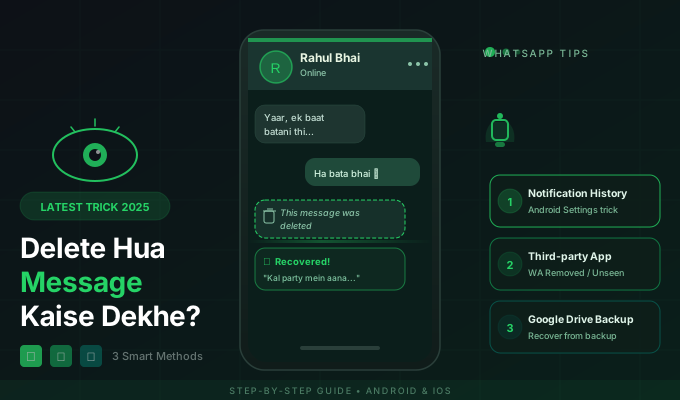
1. Notification History Se Deleted Message Dekhna
Android users ke liye ye sabse easy method hai.
- Phone Settings open karein
- Notifications par jayein
- Notification History ON karein
- Ab future me aane wale messages yaha save honge
Jab koi message delete karega, aap notification history me usko read kar sakte hain.
2. WhatsApp Backup Restore Method
Ye method tab kaam karta hai jab aapne backup ON kiya ho.
- WhatsApp uninstall karein
- Phir se install karein
- Backup restore karein
Backup ke time tak ke messages aapko wapas mil jayenge.
3. Third-Party Apps (Careful Use)
Kuch apps jaise notification saver apps deleted messages save kar lete hain.
- Play Store se trusted app download karein
- Notification access allow karein
- App automatically messages save karega
Warning: Unknown apps ko access dena risky ho sakta hai, isliye sirf trusted apps ka use karein.
4. Screenshot Habit
Agar aapko lagta hai koi important message delete ho sakta hai, to turant screenshot le lena best option hai.
Important Limitations
- Old deleted messages recover karna mushkil hota hai
- iPhone me notification history feature limited hai
- Media files (photos/videos) recover karna harder hota hai
Conclusion
WhatsApp me delete hua message dekhna possible hai, lekin har method ki apni limitation hoti hai. Notification history sabse easy aur safe method hai.
Bonus Tip 🔥
Future ke liye notification history ON rakhna best practice hai, taki koi bhi message delete hone par aap usko miss na karein.